
Need help?
Contact Us

Menu
Categories
- Accessories
- Clothing and Hats
- Education Supplies
- Home & Office Supplies
- Home and Living
- Office Electronics
- Office Furniture
- Office Products
- School Supplies
- Uncategorized
Top 7 Wireless Photo Printers for 2025: Print Anytime, Anywhere
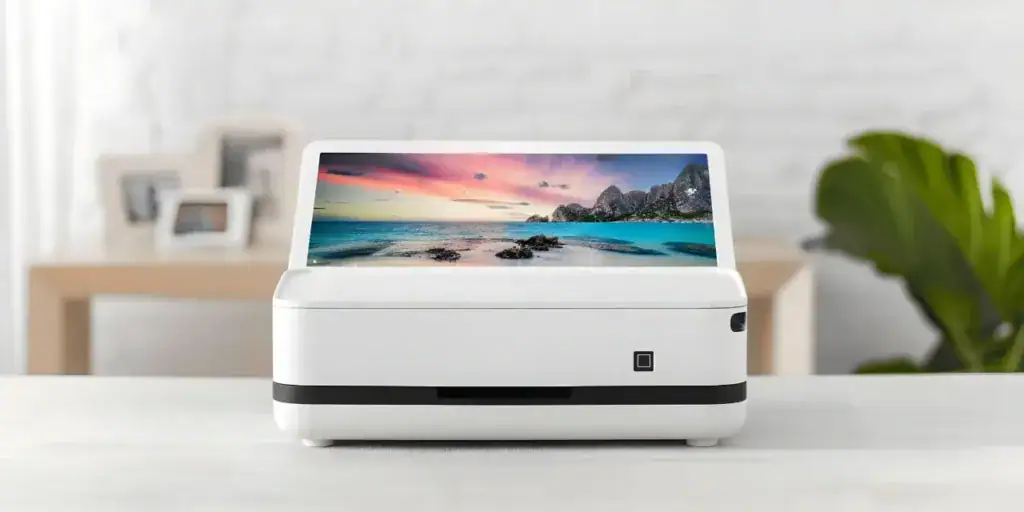
In a world driven by smartphone snapshots, having one of the best wireless photo printers means you can turn your memories into physical keepsakes instantly. Whether you’re printing from iPhone or Android, at home or on the go, this 2025 buying guide helps you find the ideal mobile photo printer—one that offers wireless connectivity, smartphone compatibility, high print quality, and portability.

Lambock Team
Tag cloud
AI Workflow AutomationAll-in-One Laser PrintersBluetooth Photo PrintersBrainstorming TechniquesBusiness Printing SolutionsChatGPT Desk MatClear Sticky NotesColor Laser PrintersContent Creation PromptsCustom Office Name PlatesDesk Name PlatesEngraved Name PlaquesExcel Cheat SheetHigh-Speed PrintersHome Photo Printing SolutionsInstant Photo PrintersLaptop BackpacksLaser PrintersMicrosoft Excel TipsMobile Photo PrintingMonochrome Laser PrintersNote Taking SuppliesOffice Branding SolutionsOffice Desk AccessoriesOffice Laser PrintersOffice ProductivityPersonalized Name PlatesPhoto PrintersPhoto Printing TechnologyPortable Photo PrintersProductivity Cheat SheetProductivity ToolsProfessional Desk DecorProfessional Photo PrintingPrompt Engineering GuideSmartphone Photo PrintersStudy OrganizationTop Rated Photo PrintersTransparent Sticky NotesVisual PlanningWaterproof Laptop BackpackWireless Laser PrintersWireless Photo PrintersWorkplace OrganizationWorkspace Organization
WHAT YOU'LL LEARN
- What to Look For in a Wireless Photo Printer
- Print & Stick Memories on the Go: Canon IVY 2 Mini Photo Printer
- Capture Life in 4×6″ Prints: Kodak Dock ERA Plus 4PASS Instant Photo Printer
- Print • Create • Inspire: Your All-in-One Home Printer — HP ENVY Inspire 7255e
- How to Choose Based on Your Use-Case
- All Photo Printers
- Final Thoughts
Table of Contents
Photo Printers
What to Look For in a Wireless Photo Printer
Choosing a good wireless photo printer involves more than just price. Here are the critical features to compare:
1
Wireless Connectivity & Smartphone Compatibility
Please make sure the printer supports Wi-Fi direct, Bluetooth, or AirPrint/MobilePrint apps so you can print directly from iPhone or Android without cables.
2
Print Quality & Technology
Look at resolution (dpi), color fidelity, and whether the printer uses dye-sublimation, inkjet photo inks, or ZINK (zero-ink) technology. High-quality prints mimic professional labs.
3
Running Costs & Consumables
Beyond the device cost, check paper/roll pricing, ink or film costs and availability. Some portable printers use special media that adds cost per print.
4
Print Size & Format Options
Decide if you want small sticky-back prints (2×3″), standard photo size (4×6″), or even larger formats. The size affects cost, versatility, and display potential.
5
Portability & Ease of Use
If you travel or print at events, compact size, battery power, and a straightforward smartphone app make a difference.
6
App Features & Creative Options
Many mobile photo printers include apps for filters, layouts, collages, and direct sharing. These enhance the user experience.
Pros & Cons
Pros
✓ Print directly from your smartphone with no PC needed.
✓ Instant gratification: turn digital images into physical prints fast.
✓ Great for travel, events, scrapbooks and creative projects.
✓ Portable models allow printing anywhere, anytime.
✓ Instant gratification: turn digital images into physical prints fast.
✓ Great for travel, events, scrapbooks and creative projects.
✓ Portable models allow printing anywhere, anytime.
Cons
✕
Smaller prints may limit framing or large-format use.
✕ Cost per print often higher than lab prints or full-sized photo printers.
✕ Some models use proprietary media making supplies more expensive.
✕ Quality may vary in cheaper or ultra-compact units.
✕ Cost per print often higher than lab prints or full-sized photo printers.
✕ Some models use proprietary media making supplies more expensive.
✕ Quality may vary in cheaper or ultra-compact units.
View More Portable Photo Printers
Explore the full range of portable photo printers for travel, events, and everyday use.
Print & Stick Memories on the Go: Canon IVY 2 Mini Photo Printer
Make your smartphone moments instantly tangible! This ultra-compact Bluetooth photo printer turns 2″×3″ photos into peel-and-stick prints using ZINK (Zero Ink) technology—no cartridges, no mess.
1
Ultra-portable design
Fits easily in your pocket or backpack—great for travel, parties, or journaling.
2
ZINK printing technology
No cartridges required—colorful dye crystals are embedded in the paper and activated by heat.
3
Sticky-back 2″×3″ prints
Each photo comes with an adhesive backing so you can stick it to laptops, notebooks, walls or memory boards.
4
Bluetooth 5.0 connection
Seamless wireless printing from your phone via the Canon Mini Print app—no computer needed.
5
Fast charging and quick prints
Get a print in 50 seconds or less, and fully charge in about 45 minutes—ideal for event use.
6
Fun customization features
Use the app to apply filters, frames, collages or tile layouts. Print square/circle stickers with optional media.
Pros & Cons
Pros
✓ Truly portable: small, light and easy to take anywhere.
✓ No ink cartridges means less mess and fewer maintenance hassles.
✓ Sticky-back prints add versatility: great for scrapbooks, journals, décor.
✓ Fast print speed and quick recharge make it convenient for events or casual use.
✓ No ink cartridges means less mess and fewer maintenance hassles.
✓ Sticky-back prints add versatility: great for scrapbooks, journals, décor.
✓ Fast print speed and quick recharge make it convenient for events or casual use.
Cons
✕
Print size is limited to 2″×3″—not suitable for large framed photo prints.
✕ Consumables (ZINK paper/stickers) are proprietary and ongoing cost may add up.
✕ Battery life or print volume may be more limited than full-sized home printers.
✕ Consumables (ZINK paper/stickers) are proprietary and ongoing cost may add up.
✕ Battery life or print volume may be more limited than full-sized home printers.
View More Portable Photo Printers
Explore the full range of portable photo printers for travel, events, and everyday use.
Capture Life in 4×6″ Prints: Kodak Dock ERA Plus 4PASS Instant Photo Printer
Transform your smartphone moments into vivid, borderless 4×6″ prints with the Kodak Dock ERA Plus 4PASS. Compact and stylish, it’s ideal for creative homes, scrapbooks, and sharing memories instantly.
4×6″ Print Size with Premium Quality
The Dock ERA Plus supports standard photo size (4″ × 6″), giving you prints large enough for display or framing — not just small stickers. With 4PASS technology it layers color and laminate for enhanced durability.
4PASS™ Dye-Sublimation Printing Technology
This printer uses Kodak’s 4PASS system: four overlaying passes including color ribbon + protective lamination — resulting in rich color, 16.7 million+ shades, and prints that are fingerprint- and water-resistant.
Smartphone Dock + Wireless Connectivity
Easily dock your phone (iOS or Android) directly into the unit or connect via Bluetooth for wireless printing. Edit your images on your phone, then print instantly.
Borderless or Bordered Print Options
Whether you want classic white-border style or full bleed borderless photos, the device supports both modes, giving flexibility in how you display your prints.
Pros & Cons
Pros
✓ High-quality 4×6″ photo prints — larger than many mobile mini-printers.
✓ Durable prints: laminated surface resists water, fading and fingerprints.
✓ Attractive design — looks as good sitting on a shelf as it prints photos.
✓ Option for both borderless and bordered prints gives creative freedom.
✓ Durable prints: laminated surface resists water, fading and fingerprints.
✓ Attractive design — looks as good sitting on a shelf as it prints photos.
✓ Option for both borderless and bordered prints gives creative freedom.
Cons
✕
While “portable”, the size and format are larger than ultra-mini mobile printers — less travel-ready.
✕ Print speed may be slower than basic thermal printers; fewer prints per minute.
✕ Not ideal if you need very large format prints (8×10″ or bigger) — it’s limited to 4×6″.
✕ Print speed may be slower than basic thermal printers; fewer prints per minute.
✕ Not ideal if you need very large format prints (8×10″ or bigger) — it’s limited to 4×6″.
View More Portable Photo Printers
Explore the full range of portable photo printers for travel, events, and everyday use.
Print • Create • Inspire: Your All-in-One Home Printer — HP ENVY Inspire 7255e
Bring your home printing game to the next level. The HP ENVY Inspire 7255e is a wireless all-in-one inkjet printer that prints, scans and copies with ease. Whether you’re producing vibrant borderless photos, school reports, or creative projects, it offers mobile printing, dual-band Wi-Fi, a dedicated photo tray, and smart features for families who want quality and convenience.
1
Wireless & mobile-friendly connectivity
Fits easily in your pocket or backpack—great for travel, parties, or journaling.
2
ZINK printing technology
No cartridges required—colorful dye crystals are embedded in the paper and activated by heat.
3
Sticky-back 2″×3″ prints
Each photo comes with an adhesive backing so you can stick it to laptops, notebooks, walls or memory boards.
4
Bluetooth 5.0 connection
Seamless wireless printing from your phone via the Canon Mini Print app—no computer needed.
5
Fast charging and quick prints
Get a print in 50 seconds or less, and fully charge in about 45 minutes—ideal for event use.
6
Fun customization features
Use the app to apply filters, frames, collages or tile layouts. Print square/circle stickers with optional media.
Pros & Cons
Pros
✓ Truly portable: small, light and easy to take anywhere.
✓ No ink cartridges means less mess and fewer maintenance hassles.
✓ Sticky-back prints add versatility: great for scrapbooks, journals, décor.
✓ Fast print speed and quick recharge make it convenient for events or casual use.
✓ No ink cartridges means less mess and fewer maintenance hassles.
✓ Sticky-back prints add versatility: great for scrapbooks, journals, décor.
✓ Fast print speed and quick recharge make it convenient for events or casual use.
Cons
✕
Print size is limited to 2″×3″—not suitable for large framed photo prints.
✕ Consumables (ZINK paper/stickers) are proprietary and ongoing cost may add up.
✕ Battery life or print volume may be more limited than full-sized home printers.
✕ Consumables (ZINK paper/stickers) are proprietary and ongoing cost may add up.
✕ Battery life or print volume may be more limited than full-sized home printers.
View More Portable Photo Printers
Explore the full range of portable photo printers for travel, events, and everyday use.
How to Choose Based on Your Use-Case
When choosing a phone storage solution, here are the key factors to consider:
1
For casual mobile printing & fun prints
Choose an ultra-portable printer (e.g., HP Sprocket, Instax Mini) for prints on-the-go, travel, parties, and scrapbooks.
2
For home photo albums & wall-worthy prints
Go with standard photo size (4×6″) or higher print quality home wireless printers (like Canon PIXMA G620 or Epson EcoTank ET-8500).
3
For creative formats (square, stickers, collages)
Look for models with creative smartphone apps and square output like Canon Selphy Square.
4
For professional or high-volume photo needs
Home models with large ink capacity, wireless connectivity, and high resolution will serve you better in the long term, despite the higher upfront cost.
Photo Printers
all Photo Printers

EDITOR'S PICK · BEST Photo Printers
4×6 Instant Photo Printer with 4PASS Printing Technology
Print vivid 4×6” photos at home with this dock photo printer. Connect your phone via Bluetooth, dock, and print durable, glossy images instantly.
- Printing Technology: Dye-sublimation (4PASS)
- Photo Size: 4×6 inches (bordered or borderless)
- Connectivity: Bluetooth with smartphone dock support
- Output Quality: Water-resistant, fingerprint-proof laminated prints
- Bundle: Includes 90 sheets of glossy photo paper
$149.99
Available on Amazon · Ships with mounting hardware

Photo Printers
Wireless Photo Printer – All-in-One Inkjet Printer for High-Quality Photos and Documents
Wireless Photo Printer – All-in-One Inkjet Printer for High-Quality Photos and Documents
Price: $149.99

Photo Printers
Professional 13″ PRO-310 Wireless Inkjet Photo Printer with 3.0-Inch Color LCD
Professional 13″ PRO-310 Wireless Inkjet Photo Printer with 3.0-Inch Color LCD
Price: $971.00
Photo Printers
Portable Photo Printer for iPhone, Android & PC – Compact Wireless Mini Photo
Portable Photo Printer for iPhone, Android & PC – Compact Wireless Mini Photo
Price: $159.99

Photo Printers
Wireless Mobile Printer for Borderless 4×6 & 5×7 Photos – Compact, Portable, High-Quality
Wireless Mobile Printer for Borderless 4×6 & 5×7 Photos – Compact, Portable, High-Quality
Price: $299.99
Final Thoughts
Wireless photo printers have matured — so whether you want instant prints from your phone or high-quality gallery-style photos at home, there’s a device for you in 2025. Focus on wireless connectivity, print size, portability, and running cost. Plug into one of the top choices above, and you’ll be turning your smartphone memories into physical keepsakes anytime, anywhere.
Lambock Team
Content Strategist — Lambock.com
Lambock – Elevate your workspace with thoughtfully designed calendars, planners, desk accessories, and productivity tools. We combine quality, style, and functionality to help you stay organized and inspired every day. Crafted for modern professionals who value both form and purpose.
- Productivity
- Device management
- School tech
- Office organisation
Share this article:
Facebook
LinkedIn
Twitter
Pinterest
WEEKLY INSIGHTS
The Focus & Storage Letter
One email per week. New product reviews, buying guides, and practical tips for distraction-free environments. No spam, ever.
Join 3,200+ readers · Unsubscribe anytime